
Dashboard
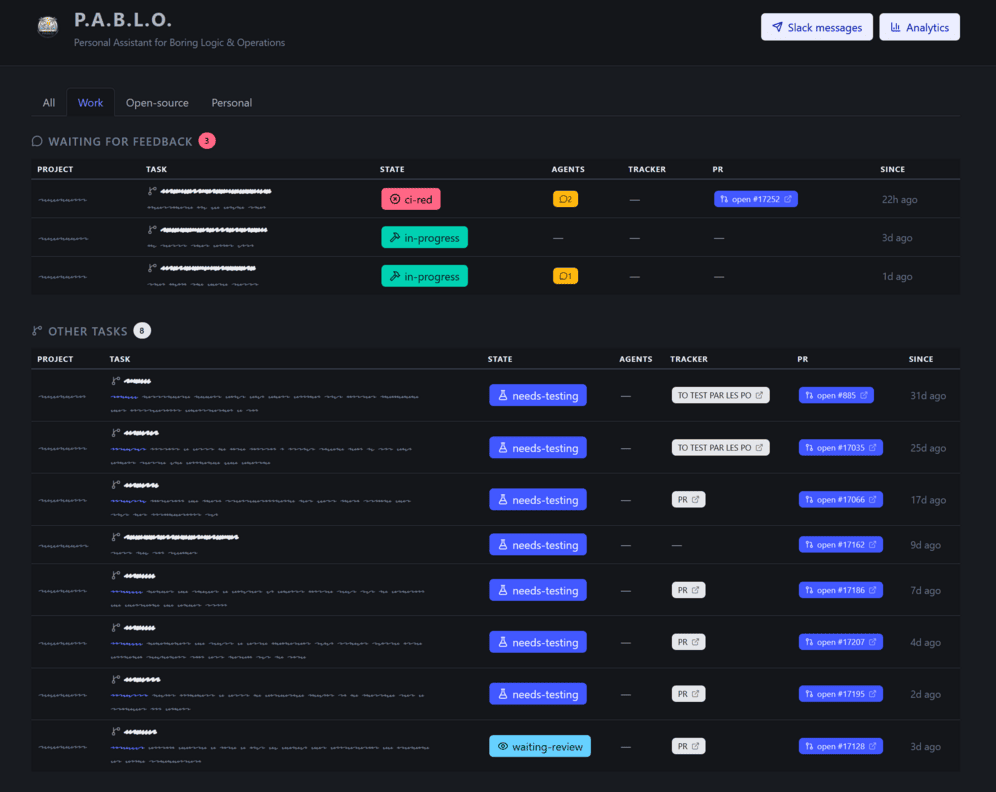
A local web page with the same picture as pablo task:list: what needs you, everything else, when the next poll happens and what the last sync did. It also has paste-ready Slack messages and token and cost analytics.
Open it#
pablo web                      # http://127.0.0.1:8321
pablo web --port 9000 --open   # another port, and open the browser
It runs on PHP's built-in web server: no Docker, nothing else to install. The installer keeps it running in the background as a service, even after a reboot; opt out with the installer's --without-web option (see Installation).
What you see#
- Project filters
- All, Work, Open-source, Personal: the project types from your configuration.
- Waiting for feedback
- Tasks that need you right now: in
in-progress,ci-red,request-changesortesting-failed, with an agent waiting for you and none still working. Tasks waiting on reviewers (waiting-review), on QA (needs-testing) or on a merge (approved) never appear here: it isn't your move. When it's empty: “Nothing is waiting on you right now 🎉”. - Other tasks
- Everything else, with the tracker status, the pull request and how long the task has been in its state.
- Poller
- A countdown to the next poll, and when each project was last polled.
- Last sync
- One card per project with what the last sync did to each branch: up to date, synced, conflict (with the files), and the command to open the conflict resolver's session if one was launched.
The task tables refresh every 30 seconds and the countdown every second, without reloading the page. Use the button in the header to switch between light, dark and your system's theme.
Start a task from the browser#
New task opens a form with two modes:
- Issue link: paste an issue URL or a key such as
PIM-123. No need to pick a project; PABLO finds it. - Prompt: pick a project and describe the work. The branch name comes from an AI summary of the prompt, so the button can spin for a little while.
It does exactly what pablo task:start does: worktree, task, task-analyst.
Change a task from the browser#
Each task row ends with buttons that open a confirmation dialog. Nothing changes until you click Confirm.
- Force state
- On every task. Pick the new state, and untick Run the state's triggers to only record it. Same as
pablo task:state, with the same rules: nowaitingfromrequest-changesortesting-failed, noneeds-testingwhen the project has no QA step. - Skip CI
- Only on
ci-redtasks. Ignores the failing checks and moves the task on to review, until the next/pablo-commit-and-pr. Same aspablo task:skip-ci.
The tables refresh as soon as the change is saved.
Slack messages#
Slack messages builds two ready-to-paste lists: your pull requests waiting for review, and the ones waiting for QA, each with a copy button. They're fetched from GitHub when you click, not when the page loads; Refresh fetches again.
Analytics#
The Analytics page charts the numbers pablo stats prints: tasks opened and closed per day, tokens and cache hit rate per agent, runtime, cost, and how long tasks sit in each state. Filter by period (7, 30, 90 days, all time) and by project type. See Analytics.
Guarantees#
- Read-only until you confirm. Loading or refreshing the page never changes a task, a worktree, a pull request or a ticket. Only three buttons change something: Start task in the New task form, and Confirm in the Force state and Skip CI dialogs.
- Local only. It always listens on
127.0.0.1and that can't be changed: the page has no login and shows branch names, issue titles and pull request links. - Fast and quiet. The tables are built from what the background poller already saved, so a page load never calls GitHub or your tracker. Only the Slack messages, New task, Force state and Skip CI forms do, when you use them.
- Works offline. Fonts, icons and scripts are all bundled; nothing is loaded from the internet.